Learn how to use the Annotation Server / Service.
Create / add groups and Login IDs
When a new book is added to work with FV::Annotations, it is added to a group.
Each user that shall access the annotations, also needs to be added to this group.
Example:
So, lets say the Group Name is „marketing“ and we have a user with the Login ID „userABC“, this user can access the book using this URL:
http://www.digitalflip.de/a4/demo_books/markpine/ flipviewerxpress.html&groupid=marketing&loginid=userABC
Image 2.
One book can be in multiple groups
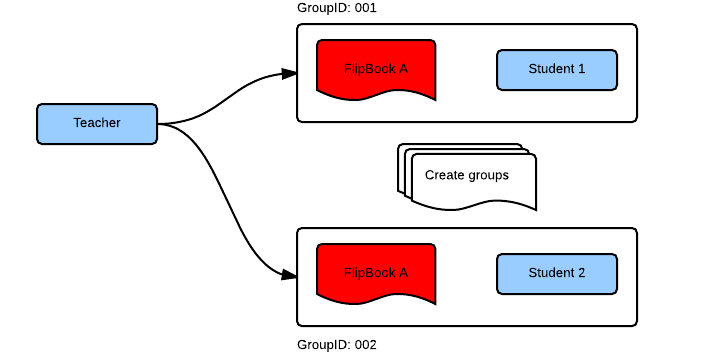
Share annotations
Annotations currently allows to share annotations in the following ways:
-
One to many, i.e a Teacher to all students that belong to a certain group name
-
Each user who has the role „Teacher“ can share the annotations with all users that belong to the group the „Teacher“ added.
Note:
The annotations are automatically shared. This means that everyone in that group will see the annotations
Image 1
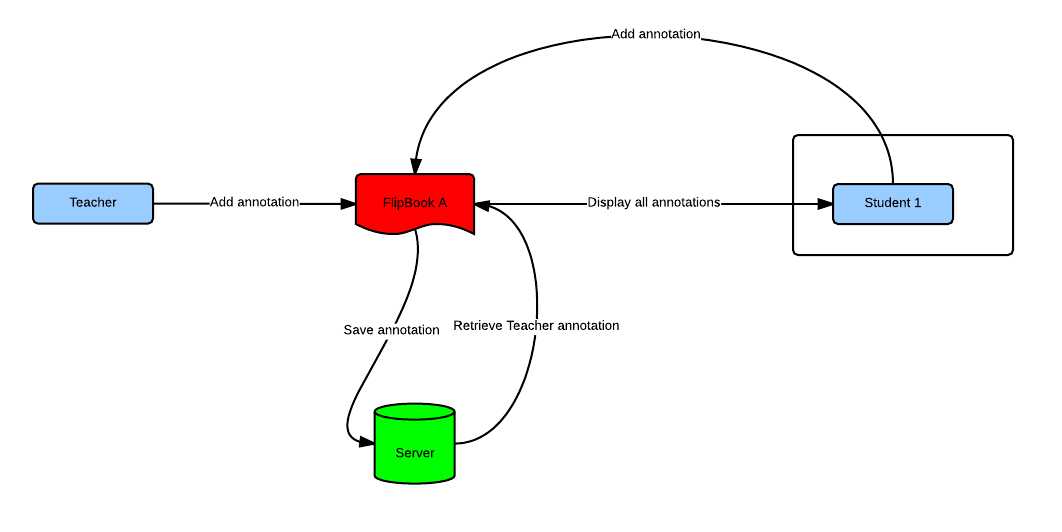 Concept of how FV::Annotations works
Access a book using FV::Annotations
To access the FlipBook using online annotations, we required two parameters: - URL to FlipBook - Group name - Login ID Let us assume that the URL of the FlipBook is:
http://www.digitalflip.de/a4/demo_books/markpine/flipviewerxpress.html
The URL to access the FlipBook and store / retrieve the annotations will be
http://www.digitalflip.de/a4/demo_books/markpine/flipviewerxpress.html?groupid=GROUP_NAME&loginid=YOUR_LOGIN_ID
Simply append
?groupid=GROUP_NAME&loginid=YOUR_LOGIN_ID to the URL.